Most coding agents try to win by adding more product: plan mode, built-in subagents, proprietary task lists, opinionated permission prompts, and a fixed idea of how software work should happen.
Pi wins by doing almost the opposite. It is a small terminal harness with strong defaults, transparent tools, durable sessions, and an extension surface that lets teams build the workflow they actually need.
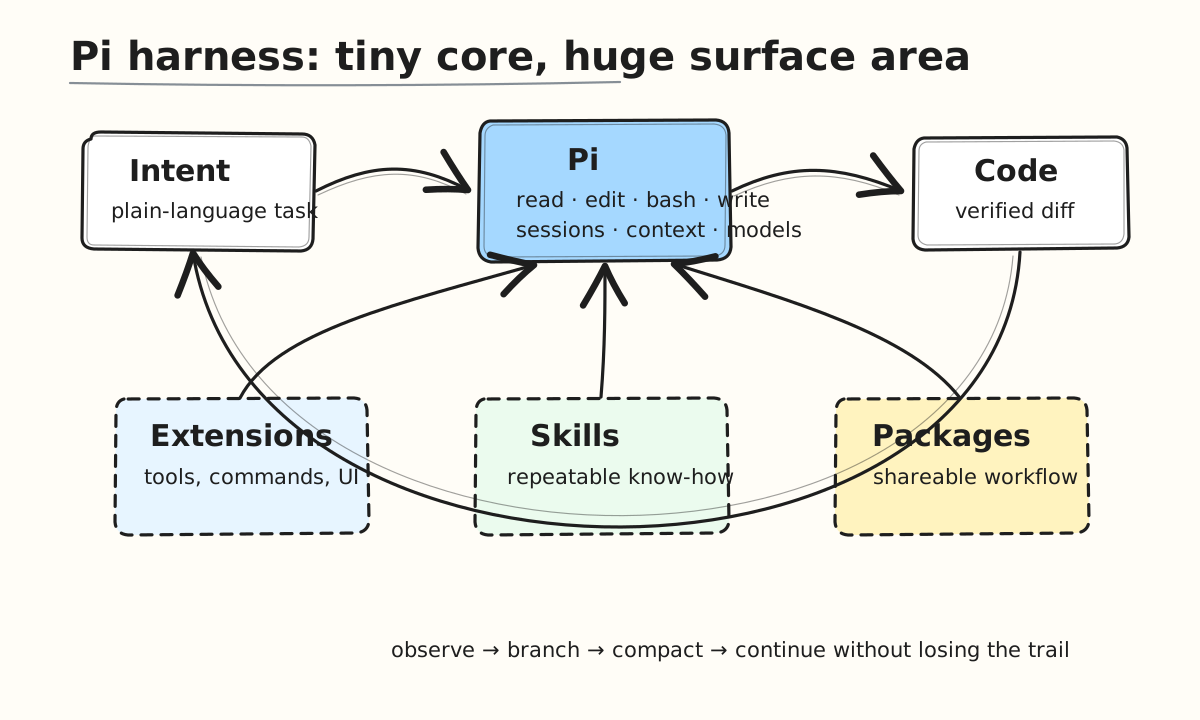
The one-line thesis
Pi is not just another coding assistant UI. It is a programmable harness for agentic software work: model choice, tool execution, session history, context policy, and workflow customization all stay under your control.
That matters because the hard part of coding agents is no longer only model intelligence. The hard part is orchestration: giving the model the right files, constraining edits, preserving history, recovering from context pressure, and letting humans steer without losing flow.
What Pi does best
| Capability | Why it matters | Pi's edge |
|---|---|---|
| Minimal built-in tools | Reduces ambiguity and unsafe magic | Defaults to direct file and shell primitives: read, write, edit, bash |
| Exact edit workflow | Makes code changes reviewable | The agent edits files through explicit replacements instead of opaque IDE state |
| Terminal-native operation | Keeps work close to git, tests, logs, tmux, and scripts | No context switch into a heavyweight app |
| Model optionality | Avoids lock-in | Supports many providers and model switching from the harness |
| Session trees | Real work is nonlinear | Branch, fork, clone, resume, export, and inspect the path that produced a change |
| Extensibility | Every team has different rituals | Add tools, commands, UI, prompts, skills, providers, and package them |
| Context control | Long tasks fail when memory becomes mush | Context files, compaction, explicit includes, and visible usage make context operational |
The technical depth: how Pi handles memory
The most underrated part of Pi is that "memory" is not treated as vibes. It is treated as a session data structure plus a context-building policy.
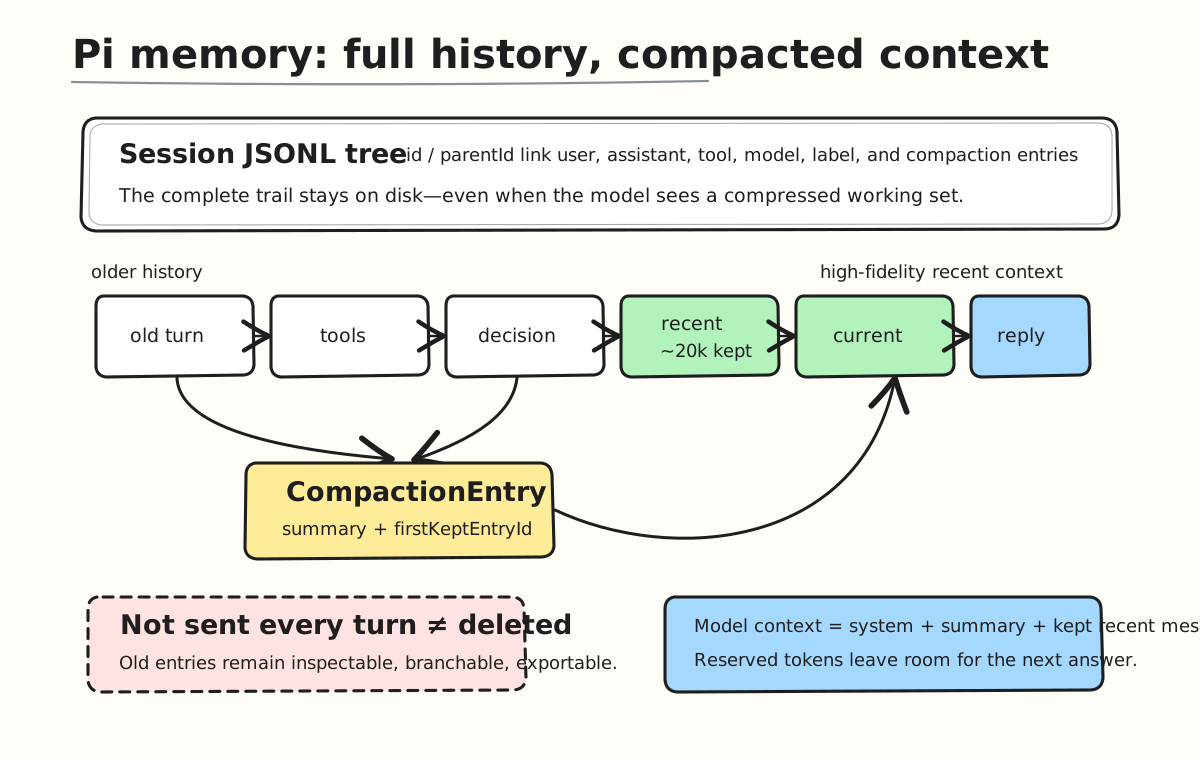
Pi stores sessions as JSONL files. Each line is an entry: user message, assistant message, tool result, bash execution, model change, thinking-level change, compaction, branch summary, label, or extension state. Entries have id and parentId, which means a session is not just a flat transcript. It is a tree.
That one design choice unlocks a lot:
| Memory primitive | What Pi stores | Why it matters |
|---|---|---|
| Append-only session log | Every meaningful event as JSONL | You can inspect, export, replay, or debug the path that produced a change |
| Parent-linked entries | id / parentId tree | Branching does not destroy history |
| Compaction entries | Summary + firstKeptEntryId + tokensBefore | Old context can be compressed without deleting the original trail |
| Branch summaries | Summary of the branch you are leaving | Switching approaches does not mean losing the context of prior exploration |
| File-operation details | Read and modified files tracked through summaries | The agent retains operational memory, not just prose memory |
| Custom entries/messages | Extension-controlled state and injected context | Teams can persist their own workflow memory |
Compaction is not just summarization
Most people hear "context compaction" and imagine a generic summary. Pi's version is more deliberate.
Auto-compaction triggers when the current context gets too close to the model's context window. The rule is roughly:
contextTokens > contextWindow - reserveTokensBy default, Pi reserves around 16k tokens for the model's next response and keeps around 20k recent tokens unsummarized. That means the newest work stays high-fidelity while older work is compressed into a structured summary.
The flow looks like this:
- Walk backward from the latest message.
- Keep recent messages until the
keepRecentTokensbudget is reached. - Choose a safe cut point, normally at a turn boundary.
- Summarize older messages into a structured compaction entry.
- Reload the session context as: system prompt + compaction summary + kept recent messages.
The detail I like: Pi avoids cutting at tool results. Tool results must stay paired with their tool calls, otherwise the model receives orphaned evidence. If a single giant turn exceeds the recent-token budget, Pi can split the turn and summarize the early prefix separately.
That is memory engineering, not just prompt trimming.
What the model actually sees
After compaction, the model does not receive the entire historical transcript. It receives a reconstructed working set:
| Context layer | Included in model prompt? | Purpose |
|---|---|---|
| System prompt and project context | Yes | Rules, repo instructions, global behavior |
| Latest compaction summary | Yes | Compressed long-term memory |
Recent messages from firstKeptEntryId onward | Yes | High-resolution short-term memory |
| Full old JSONL entries | No, unless revisited | Audit trail and recoverability |
| Extension custom entries | No by default | Persistent app/plugin state |
| Extension custom messages | Yes, if injected | Team-specific contextual memory |
This separation is a big deal. Pi preserves historical truth on disk while sending the model a budgeted operational memory. You get recoverability without paying the full token cost every turn.
Branch memory: why trees beat transcripts
Linear transcripts are bad at real engineering. You try one approach, hit a wall, back up, explore another approach, then realize one decision from the abandoned branch still matters.
Pi's /tree model handles this by letting you navigate to earlier entries and continue from there. When you leave a branch, Pi can create a branch summary: it finds the common ancestor, summarizes the path you are leaving, and carries that context into the new branch.
| Scenario | Linear chat memory | Pi session tree |
|---|---|---|
| Try approach A, then approach B | A pollutes B or gets lost | A and B become separate branches |
| Need to revisit a prior decision | Scroll and pray | Jump to the entry in /tree |
| Want a clean alternate implementation | Start a new chat | Fork or clone from the exact point |
| Need auditability | Export a transcript | Inspect the JSONL event trail |
This is why Pi's memory feels more like version control than chat history.
Why this is different from a feature-heavy agent
Feature-heavy agents usually bake in one workflow. That feels impressive on day one, but it becomes a tax when your repo, team, CI, security model, or debugging style is different.
Pi's differentiator is that the core stays small while the edges are open.
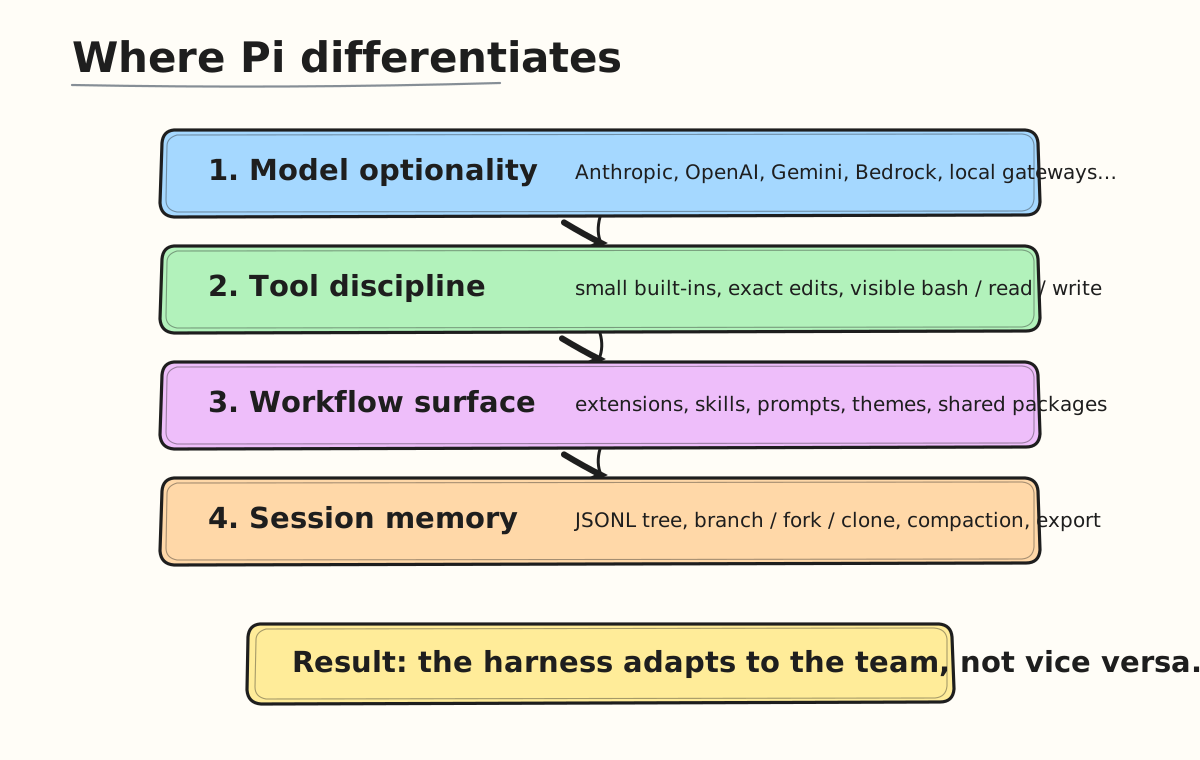
Instead of saying, "Here is the one true way to run a coding agent," Pi says:
- Use any supported model that fits the task.
- Keep the primitive tools understandable.
- Add only the workflow features you need.
- Store sessions in a format that can be inspected and reused.
- Treat extensions and skills as first-class product surface, not hacks.
A practical scorecard
These are qualitative but useful metrics for comparing agent harnesses in day-to-day engineering work.
| Metric | Traditional locked-in agent | Pi harness |
|---|---|---|
| Workflow adaptability | Medium | High |
| Provider lock-in risk | High | Low |
| Ability to inspect what happened | Medium | High |
| Team-specific automation | Medium | High |
| Startup complexity | Low | Low |
| Long-session recoverability | Medium | High |
| Terminal/Git/CI fit | Medium | High |
| Opinionated product surface | High | Intentionally low |
The important bit is not that Pi has every feature preinstalled. The important bit is that when a feature matters, Pi gives you a clean place to build it.
The hidden productivity metric: steering latency
When developers evaluate coding agents, they often measure task completion. I think the better metric is steering latency: how quickly you can redirect the agent when reality changes.
| Steering moment | Bad harness behavior | Pi-style behavior |
|---|---|---|
| Test fails midway | Wait, copy logs, restart context | Run shell, feed output back, continue |
| You notice a wrong assumption | Stop and rebuild prompt | Queue steering while work is in flight |
| Need an alternate approach | Lose the current path | Branch or fork the session |
| Context gets bloated | Start over | Compact and keep going |
| Team needs a custom guardrail | Hope vendor adds it | Build an extension |
This is where Pi feels like a gamechanger: it optimizes for the loop, not the demo.
Why extensions are the moat
A coding harness becomes powerful when it lets the team encode taste. Pi extensions can add custom tools, commands, keyboard shortcuts, UI, status lines, permission gates, custom compaction, checkpointing, provider integrations, or even subagent behavior.
That turns Pi from a single product into a platform for agent workflows.
For example, a team can create:
- a deploy command that knows its staging environments,
- a security gate that blocks writes outside approved paths,
- a review skill for internal style rules,
- a package that bundles prompts, themes, and tools for a specific repo type,
- a custom session export for audits or evals.
The differentiator is not customization for aesthetics. It is customization for operational correctness.
Why the minimalism matters
Pi deliberately avoids baking in some features that other tools advertise: no mandatory plan mode, no default subagents, no forced permission popups, no built-in todo system. That can sound sparse until you realize the philosophy: these are workflow choices, not universal primitives.
If you need them, build or install them. If you do not, you avoid the cognitive overhead.
That is exactly how a good harness should behave.
Final take
Pi is better because it treats the coding agent as part of the engineering environment instead of replacing the environment.
It keeps the core loop simple:
- understand intent,
- inspect the repo,
- make precise edits,
- run commands,
- preserve the trail,
- branch or compact when needed,
- extend the workflow when the default is not enough.
That combination makes Pi feel less like a chatbot with tools and more like agent infrastructure. For serious software work, that is the gamechanger.